Showing posts with label DDWRT. Show all posts
Linksys WRT54GS v7 Hack to DDWRT
 A lot of article around Linksys WRT54GS hack may be. But, I just share to you, how to step by step WRT54GS (Version 7) hacking. Because many benefit, if you have bravery.
My router was killed for this way. I buy another router and I hack again! Never can be stopped.
One of Benefit :
- Can be use for capturing packet (wardriving method). If you set router to client mode, many software support this act (e.g. Comview for LAN, wireshark).
- Up to 128 clients (AP mode).
- Up to 250 mW.
- Unique feature (Hotspot portal, Virtual LAN, wireless client, adjust txpower, adjust date rate, adjust CPU frerequency, and more).
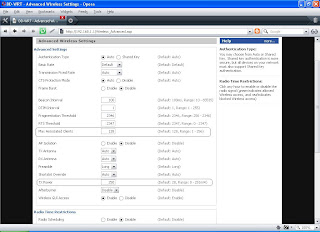


Step by step:
- Download dd-wrt.v24_micro_wrt54gv8.bin ( My CPU Broadcom BCM5354 chip rev 2 for WRT54GS V.7).
- Download vxworkskillerGSv7-v3.bin. (or visit http://www.dd-wrt.com/dd-wrtv3/dd-wrt/downloads.html)
- Download befsx41_tFtp.exe (for rebuild your system).
- Unplug your router.
- Push the reset button while plugging your router back in. Once plugged in continue to push the reset button around 30 seconds.
- Open your browser and type 192.168.1.1 (default IP Router).
- Make use of the browse button & locate the vxworkskillerGSv7-v3.bin file, then click [upgrade].
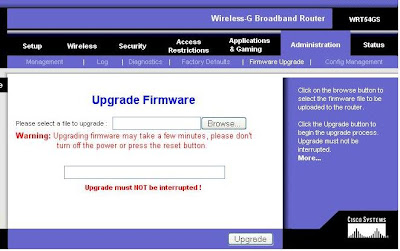
- After it says "upgrade complete dialogue" unplug the router, plug it back in, sit back for a few 1-2 mins). Unplug it again, and then plug it back in.
- Open befsx41_tFtp.exe.
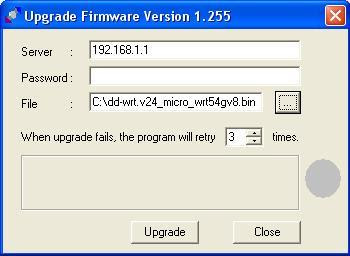
- Enter 192.168.1.1 as the server address (leave the password blank).
- [Browse] your way to the dd-wrt.v24_micro_generic.bin.
- Click [upgrade]. Please wait....
- Done default passsword (username:root)(password:admin).


 -------------
Special thank's:
BrainSlayer
DD-WRT (http://www.dd-wrt.com)
Linksys tutor; how to upgrading firmware, find your router series.
Copy this code into your website if you want to link this page:
Simple Your Share Internet Connection with "Smart Router"
 My Team, found the concept of router with a "Smart router". We can share internet connection from ISP (Internet Service Provider) with DD-WRT-WRT54GS. The internet can be shared up to 4 connections via LAN. This making 1 server and bridged to 3 clients, or without server.
Tools:
- WRT54GS V7 with OS DDWRT
- 4 LAN cable , minimum 2 units
- 4 PC/laptop (optional), minimum 2 units
- Internet connections from ISP or other
Let’s Begin:
1. Login
2. Click [status]
3. Click [Wireless]
4. Click [site survey]
5. View you’re connection [Neighbor's Wireless Networks]
6. Click [join] to your ISP or other
7. After [Successfully joined the following network as a client] from your ISP, set [wireless mode] to [client]
8. Click [Network Configuration] to [bridge] check box
9. Click Apply Setting
10. Click [Setup]
11. In the [network setup] insert you’re Gateway (from ISP)
12. In the [Network Address Server Settings (DHCP)] set [DHCP Server] to [enable]
13. Type you’re all your IP [Static DNS] from ISP
14. Click [Apply Setting]
Look in the network diagram.


